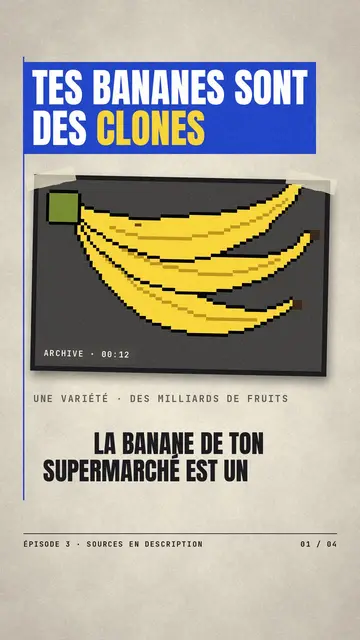
動態字體影片製作工具 — Swiss grid 風格
用瑞士設計製作動態字型影片:嚴謹網格、巨大數字與數據條,適用於經濟、排名與數字主題,內含語音。
Included from Starter, with all 24 styles plus your own · preview rendered by the ClipOnIt engine
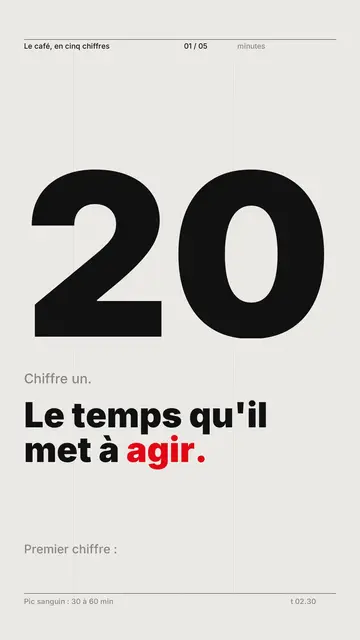
此風格的呈現效果
Swiss grid tells the story with typography alone, in the tradition of Swiss graphic design. The background is light paper, the ink nearly black, and a single signal colour, red by default, is used for everything that matters. As each scene opens, a six-column grid draws itself on screen, then a giant figure, set flush left, climbs in steps to its value, with its unit.
The title line reveals itself word by word with the voice, sliding out of a mask, and important words switch to the signal colour. Data bars, one per column, land on the beats; the signal bar alone arrives at a constant speed, to draw the eye. At the end of a scene, a coloured line slices the screen and everything collapses. The style skips fades, shadows and grain: motion is crisp, with only two easing curves.
適合的主題
Avoid: stories carried by characters, places or objects: the style draws no illustrations, only text and bars. Also avoid topics without solid figures; making up a number to fill the grid shows straight away.
- Economics and financeA rate, a price or a salary becomes the scene's giant figure, and the bars show how it changes.
- RankingsFour bars at most per scene, the top one in the signal colour: the podium reads at a glance.
- Country comparisonsThe grid lines values up side by side, which makes the gap obvious.
- Company reports and resultsThe clean look and single signal colour are easy to match with brand guidelines.
此風格的影片創意
- Coffee in five numbers
One scene per figure: production, price, consumption, the grower's share, and the signal bar on the surprising one.
- Inflation explained
The rate as a giant figure, then four bars for rent, energy, groceries and wages.
- The countries that work the most
Annual hours as bars, your country in the signal colour, and the line that explains the gap.
- Your year in review in one minute
The company's four key results, each with its own grid, for a report people actually share.
只需 1 次點擊即可取得
- 開啟此風格的連結
點擊「以此風格建立影片」按鈕,即可開啟編輯器並預先選好此風格。沒有帳號的話,註冊只需一分鐘,也不需信用卡。
- 用一句話寫下你的主題
一個想法就夠了。你也可以貼上文字,或在 Starter 方案中對麥克風講述:影片會以你的聲音為基礎來製作。
- 檢視,然後渲染
AI 撰寫場景,依照文字時間點安排風格元素,並加入語音與字幕。你可以修改不妥之處,幾分鐘後即可取得直式 MP4。
你可以調整的項目
For each scene you set the giant figure and its unit, the grey lead-in, the title line and its words in the signal colour, up to four bars written as “label: value” (an exclamation mark picks the signal bar) and a note at the bottom. The signal colour can be changed to match your brand. You can also set the length, rewrite the narration or ask for three variants of a scene. From Starter, your own voice and the AI Director are included.
Frequently asked questions
免費與否、輸出格式、用途:簡短解答。
What is kinetic typography?
A video where the text itself moves and carries the message, instead of illustrations. Here, words appear with the voice, numbers climb and bars land inside a Swiss design grid.
Are the numbers checked?
AI writes from your topic, but it is up to you to check each value before rendering. The safest way is to paste your own text with your sources: the bars then use your figures.
Can I use my brand colours?
Yes, the signal colour can be changed. Keep just one: that is what makes the style readable.
此風格有免費方案嗎?
No, it comes with Starter ($29/month): 15 watermark-free videos a month, all 24 styles plus your own. The free plan gives 3 videos a month with a watermark in 8 other styles: Pixel News, Press paper, Comedy cartoon, Class sketch, Night tale, Social screen, Retro synthwave and Flat vector.